
Preview your photo with a real Samsung Frame matte, before you upload
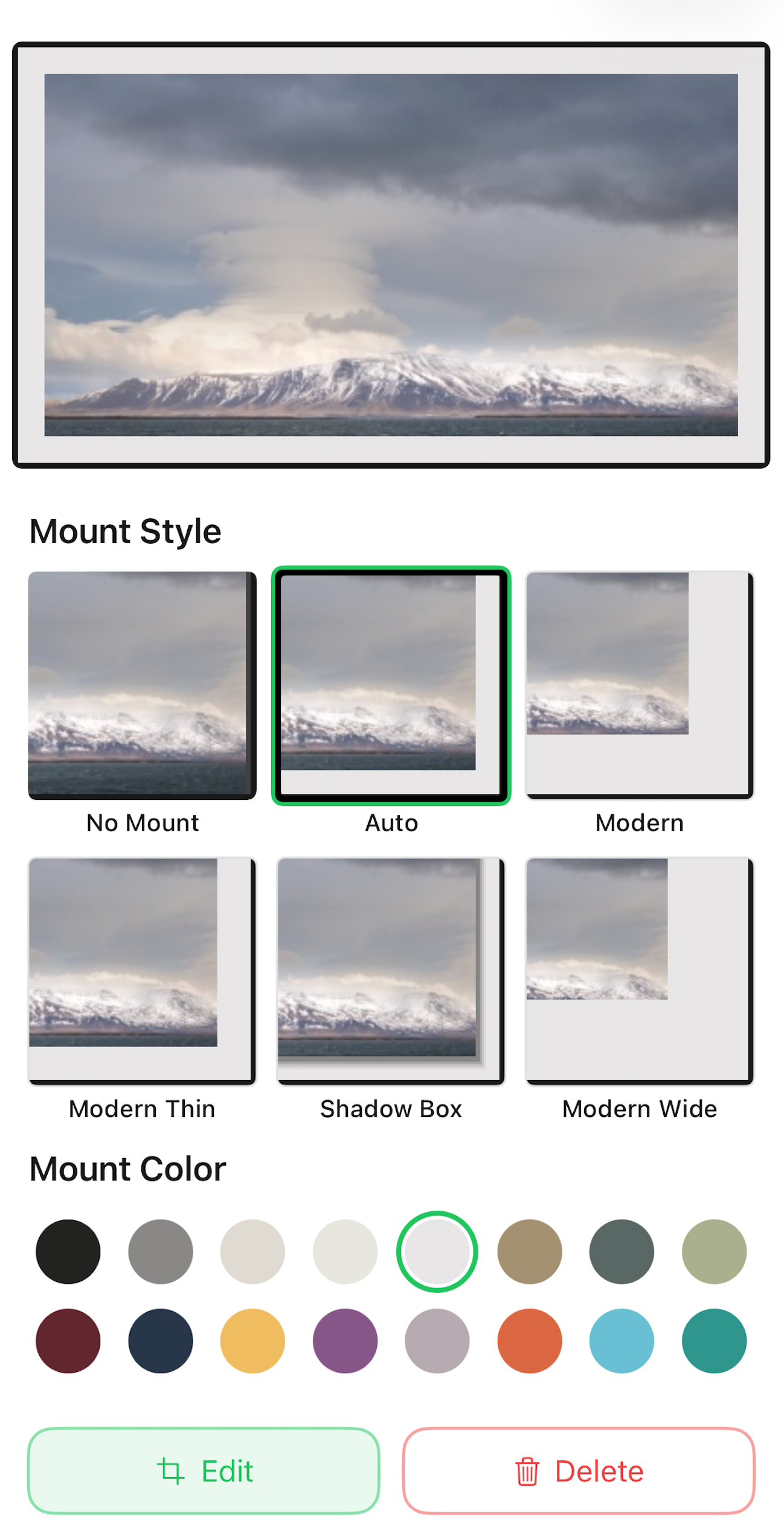
Frame Photos shows your photo inside a true-to-TV Samsung mount before anything is sent: all 16 real matte colors and 6 mount styles, rendered around your actual photo, for free. What you approve on your phone is what appears on the wall, no upload-and-hope, no surprises in the living room.
Works with every Frame model year from 2017 to 2026. When you are happy with the framed result, sending it takes seconds: here is the full upload guide.
Why the matte changes everything
The matte is what turns a TV screen into something that reads as framed art. The same photo can look like a screensaver with no border, like a gallery print in a wide warm mount, or moody and modern on black. Because the effect depends so much on the photo, the wall color, and the room, guessing rarely works. Previewing does. That is why the matte editor in Frame Photos is free and sits in front of every upload.
Which matte colors does The Frame have?
Samsung The Frame offers 16 matte colors, including polar and warm whites, neutral, antique, sand, sage, seafoam, navy, burgundy, and black, combined with 6 mount styles: no mount, flexible, shadow box, modern thin, modern, and modern wide. Frame Photos includes every one of them in its free matte editor, so you can flip through all combinations on your own photo before anything reaches the TV.
The 16 matte colors
- Polar
- Warm
- Neutral
- Antique
- Sand
- Apricot
- Sage
- Seafoam
- Turquoise
- Sky blue
- Navy
- Lavender
- Byzantine
- Burgundy
- Red orange
- Black
The 6 mount styles
- No mount: full-bleed, edge to edge
- Flexible: adapts to your crop
- Shadow box: deep gallery-style inset
- Modern thin: narrow border
- Modern: classic even border
- Modern wide: wide museum border
16 colors × 6 mounts, all previewed live around your photo before you send.
How do I preview art with a frame style before buying or uploading?
Open any image in the Frame Photos matte editor: it renders the picture inside a true-to-scale Samsung mount, and you flip through all 16 matte colors and 6 mount styles with a live preview. That makes it a free mockup tool: use it on your own photos before uploading, or on a saved image of artwork to judge how a piece will look framed on The Frame before you buy it.
HEIC, JPEG, and PNG are converted automatically, so anything in your photo library or downloads folder works. You can crop for landscape or portrait-mounted Frames, compare a warm museum mount against a thin black border, and nothing is sent to the TV until you tap upload. Wondering how Frame Photos compares to other options for this? See the best Frame TV photo apps compared.
Can I get a matte border without a subscription?
Yes. The matte editor in Frame Photos is free, every color, every mount style, full preview, and your first 4 uploads to your TV are free too. After that, a one-time $9.99 unlock covers unlimited uploads, albums, collages, fast slideshow, and Party Mode. No subscription is needed for mattes; the optional $2.99/month plan exists only for cross-platform cloud sync.
Frame Photos is currently free for a limited time, and early downloads keep full access. Full details are on the pricing page.
No-mat, full-bleed photos
Not every photo wants a border. Frame Photos also supports the no-mount option, filling the Frame’s screen edge to edge, great for sweeping landscapes, city skylines, or a family photo you want as large as possible. Pick no mount in the same editor, check the crop in the live preview, and send. Switching a photo between full-bleed and matted later is just another upload.
Is your Frame screen shiny?
That depends on the model year. Samsung introduced the anti-reflective matte display finish with the 2022 Frame; 2017–2021 models have a glossier screen. A software matte border changes the mount around your photo, not the screen surface. No app can turn a glossy panel matte. What the matte border does do is make a photo read as framed art on every model year, and Frame Photos supports them all, 2017 through 2026.
Frequently asked questions
How many matte colors does Frame Photos include?
All 16 real Samsung matte colors, from polar and warm whites through sage, navy, and burgundy to black, combined with all 6 mount styles, including modern, modern thin, modern wide, shadow box, flexible, and a no-mount full-bleed option. The matte editor is free.
Is the matte preview exactly what appears on the TV?
Yes. Frame Photos uses the same mount and color identifiers The Frame itself understands, so the preview on your phone is the combination the TV renders. You approve the framed result before anything is uploaded.
Can I try the matte editor before connecting a Frame TV?
Yes. The preview renders on your device, so you can mock up photos or artwork with any matte and mount style first. You only need a Frame on the same WiFi when you are ready to send. Your first 4 uploads are free.
Do mattes work on older 2017–2021 Frame models?
Yes. Frame Photos supports every Frame model year from 2017 to 2026, including the older 2017–2021 art interface that many apps struggle with. Mattes and mount styles preview and upload the same way on every model year.
See your own photo framed first
Download Frame Photos, open a photo, and flip through all 16 mattes and 6 mounts for free. When one clicks, your first 4 uploads to your Frame are free before the one-time $9.99 unlock.